Piano - music & songs games
- 4.7
- Rating
- 10.00M
- Installs
- Free
- Price

 Analysis by App-foxy
I approached Piano - music & songs games as a quick musical practice tool rather than a replacement for a full piano course. Its main appeal is simple: it turns short sessions into a game-like way to work on timing, attention, and familiarity with piano melodies. That focus makes it easy to pick up when I have only a few spare minutes, although it also means experienced players may eventually want something more demanding.
This is a free Music & Audio app from MWM - AI Music and Creative Apps, available for Everyone and compatible with Android 7.0 or later. It has reached over 10 million installs and holds a 4.7 average from around 273 thousand ratings, so it is clearly aimed at a broad audience rather than only trained musicians. The current version is 3.55.00, and optional purchases range from $0.99 to $89.99 per item.
Why the game-like piano format matters
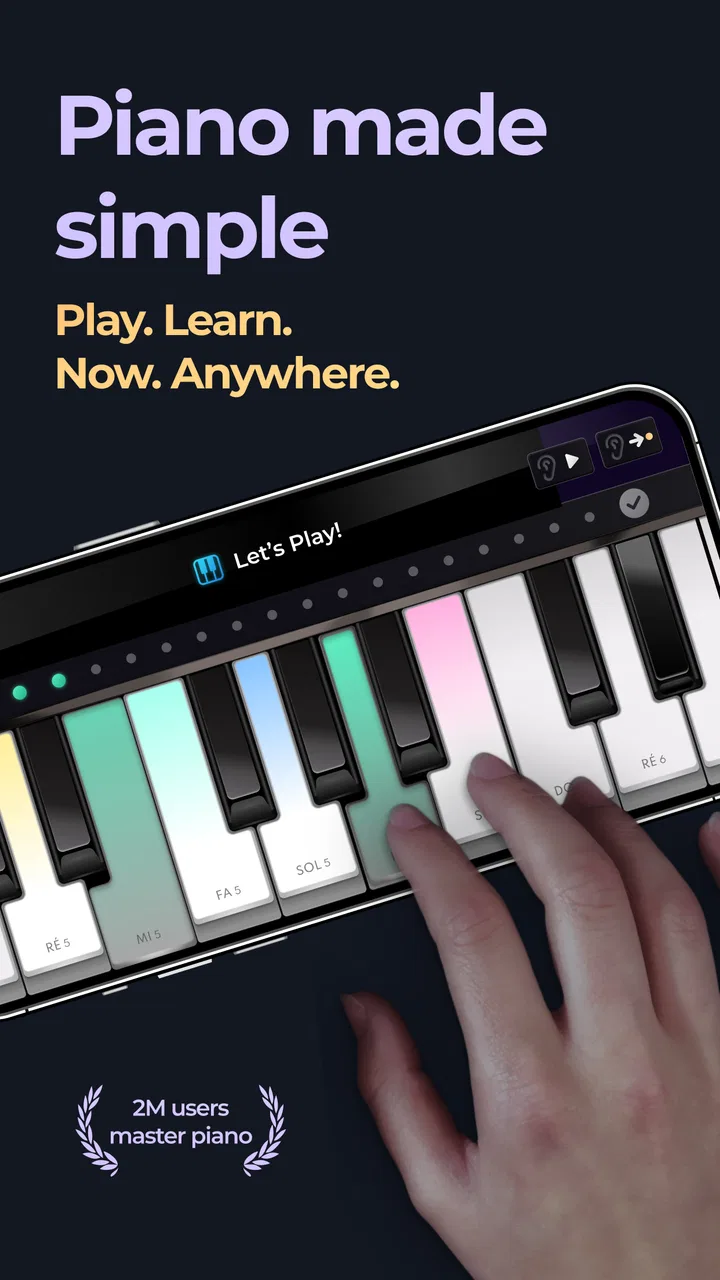
The important capability here is not simply displaying piano keys. It is the way the app makes playing feel like a sequence of small challenges. Instead of opening a blank instrument and wondering what to play, I can start with a defined musical task and concentrate on following the notes as they arrive. That structure removes much of the hesitation that often stops beginners from practicing.
You May Also Like

 Blood Strike: 2.5 Anniversary
Blood Strike’s Loadouts Turn Every Drop Into a Tactical Gamble
A close look at Blood Strike’s custom loadouts: how fast access to signature weapons reshapes its battle royale rhythm, rewards preparation, and narrows the gap between fights.

 Pandora - Music & Podcasts
Pandora’s Music Is Easy to Start, but Harder to Recover
Pandora’s strength is its low-effort path from a seed to a station. Its weak spot is how much confidence it asks you to place in connection, setup, and quiet recovery.

 8 Ball Pool
 Is Built on Rivalries, Rematches, and Routine
A close look at the rivalries, rematches, shared routines, and unanswered safety questions that turn a quick pool match into a persistent mobile community.

 Samsung Music
’s Quiet Strength Is Playing What You Already Own
Its reach comes less from spectacle than from dependable access to a personal library. That simplicity is both the app’s strongest retention engine and its ceiling.

 AccuWeather: Weather Radar
AccuWeather Review: A Quick, Clear Forecast for Everyday Decisions
For everyday plans, the best forecast is the one you can understand quickly. AccuWeather makes rain timing, radar, and local conditions easy to act on, with a few trade-offs.

 Hill Climb Racing
Why Hill Climb Racing Still Turns Crashes Into One More Run
A tiny car, a bumpy hill and one more upgrade: Hill Climb Racing keeps resurfacing because its simple chaos makes every near-miss feel personal.
More From Our News Desk



In everyday use, this changes the purpose of a short session. I do not need a keyboard, sheet music, or a long uninterrupted block of time to get started. A few minutes can become a focused exercise in visual reaction and rhythm. For someone who enjoys mobile games but has never stayed with a traditional instrument app, that low-pressure entry point is the strongest reason to try it.
I also found that the format encourages repetition without making every attempt feel like formal study. Repeating a difficult passage in a conventional lesson can feel slow, while a game-style attempt gives me an immediate reason to try again. That is useful for building consistency, even if it does not provide the complete technique training of a teacher or structured piano method.
The smartest way to use it is as a habit builder, not as proof that you have learned piano. It can help me become more comfortable with musical timing and note patterns, but success inside a touch-based game does not automatically translate into finger independence, hand position, dynamics, or confident playing on a real instrument.
What playing feels like on a phone
On a phone, the experience is naturally more compact than sitting at a piano. I watch the screen, place my finger where the app indicates, and try to stay with the musical flow. The arrangement is approachable because the visual instructions tell me where attention should go. I am not forced to decode conventional notation before hearing a result, which makes the first session much less intimidating for a complete beginner.
That simplicity has a clear benefit for children and casual players. A user who might be discouraged by a keyboard diagram or a page of sheet music can begin by responding to what is directly in front of them. The Everyone content rating also fits that broad, family-friendly positioning, although younger users may still need help understanding that the game is entertainment and practice rather than a full music curriculum.
The limitation is the same feature that makes it welcoming. Touch controls cannot reproduce the physical response of piano keys. There is no substitute for learning how much pressure to use, how to move between keys efficiently, or how both hands coordinate across a real keyboard. I would therefore treat the app as a listening and timing exercise, not as a complete simulation of an acoustic or digital piano.
A practical session from start to finish
My preferred approach is to begin with a short, manageable session instead of trying to play for a long time. I choose a challenge that feels achievable, keep my attention on the next note rather than the whole sequence, and repeat the section when a mistake comes from rushing. This makes the app more useful than mindlessly tapping through songs, because I am actively noticing where my timing breaks down.
A helpful trick is to separate accuracy from speed. On a first attempt, I focus on recognizing the pattern and staying calm after an error. On the next attempt, I try to make the same passage smoother. This small change prevents the common mobile-game habit of tapping faster whenever a section becomes difficult. The result is more controlled practice, even though the app itself is designed to remain accessible.
I would also recommend using headphones when the surroundings are busy. The sound gives the session more musical context than the screen alone, and it becomes easier to notice whether I am keeping a steady flow. In a quiet room, the phone speaker is enough for casual play, but headphones make short practice sessions feel more focused and less like random tapping.
The best everyday scenario
The app makes the most sense during the small gaps that are too short for a full lesson: waiting for an appointment, taking a break from work, or winding down before bed. Imagine someone who has downloaded a piano learning app several times but rarely opens it because each session feels like a commitment. Here, that person can use a brief challenge as a musical reset without preparing a keyboard or arranging a study space.
For me, the best routine would be a few attempts during a daily break, followed by a longer session on a real keyboard when available. The mobile game keeps the interest alive between those larger sessions, while the physical instrument handles the skills the phone cannot teach. That combination is much more realistic than expecting one app to cover every part of learning piano.
It can also work well for families sharing a device. One person can play a short challenge, then hand the phone to someone else without needing to preserve a complicated lesson plan. The immediate visual feedback makes it easy to understand what is happening, even for a first-time user. The trade-off is that a shared, casual experience may not provide enough progression for someone who wants a carefully measured curriculum.
Where it sits beside traditional alternatives
Compared with a blank virtual piano, this app gives me a reason to play. A basic keyboard app is better when I want to experiment freely, find notes, or play without a target. Piano - music & songs games is stronger when I need direction and motivation. Its game structure turns the instrument from an open-ended canvas into a sequence of tasks, which is more inviting for beginners who do not yet know what to practice.
Compared with a full piano-learning service, it is lighter and less comprehensive. A dedicated lesson platform is usually the better choice for posture, reading music, technique, theory, and a long-term study plan. I would choose this app when motivation and quick access matter more than formal instruction. I would choose the lesson-focused alternative when I am ready to practice deliberately and track musical skills beyond screen accuracy.
It also differs from rhythm games that use music mainly as decoration. Here, the piano presentation gives the activity a more specific musical identity. Still, users should not confuse a familiar melody and successful taps with the ability to perform the same piece independently. The app’s value is strongest at the intersection of entertainment, attention training, and first contact with piano patterns.
Costs, pacing, and the points that may frustrate me
The app is free to start, which lowers the barrier for anyone who wants to test the format before spending money. Optional purchases are available, with individual items priced from $0.99 to $89.99. I would advise checking the purchase screen carefully and deciding in advance whether I am only exploring the free experience or considering paid content. That is especially important for families, where a child may be more interested in continuing immediately than in understanding the cost of an optional item.
The free entry is useful, but it does not automatically make the app the best value for every player. Someone seeking a complete music education may get more from paying for a structured course that explains technique and gives feedback on real playing. Someone who only wants occasional musical entertainment may find the free experience sufficient. The right choice depends on whether the game is being used for enjoyment, habit formation, or serious study.
Another possible friction point is repetition. Repeating a short passage can be motivating when I am close to getting it right, but it can become tiring if I expect the app to provide endless depth. This is where setting a personal stopping point helps. I would rather finish after a focused few attempts than continue tapping after my attention has disappeared. The app works best when it supports a routine, not when it becomes a test of endurance.
Screen size matters too. A phone is convenient, but the available touch area is still limited. Users with larger hands or anyone who prefers the spacing of a physical keyboard may find a tablet more comfortable, while a real piano remains the better option for learning hand movement. This is not a defect unique to this title; it is the unavoidable trade-off of putting a piano activity on a mobile screen.
Who will get the most from it
I would recommend it first to beginners who want a friendly introduction without committing to formal lessons. It is also a good fit for people who enjoy rhythm-based challenges and need an easy reason to practice regularly. Parents looking for a simple, age-appropriate music activity may appreciate how quickly a child can understand the basic interaction, provided expectations remain realistic.
Casual players who already know a little piano can use it as a warm-up or a way to keep musical attention active during travel. The benefit is convenience: the app can fill a gap when a keyboard is unavailable. It is less suitable as the main tool for an intermediate or advanced pianist who wants nuanced expression, complex arrangements, or detailed technical correction.
I would skip it if my primary goal were to learn to read sheet music from the beginning, prepare for an exam, improve posture, or develop a reliable two-handed technique. In those cases, a teacher, a real keyboard, or a dedicated lesson app would be a better investment of time. I would also skip it if I dislike repetition and game-like scoring, because the central appeal depends on enjoying short, focused challenges rather than treating the phone as a neutral instrument.
My recommendation after using the app
MWM - AI Music and Creative Apps has made a sensible choice by focusing on immediate interaction instead of overwhelming new players with music theory. The result is approachable, portable, and easy to fit into an ordinary day. Its strong rating and more than 10 million installs reflect how naturally this kind of piano game fits casual mobile use, although popularity should not be mistaken for a complete learning system.
My honest recommendation is to download it when I want motivation, quick musical practice, or a playful first step toward piano. I would pair it with a real keyboard or a more structured course if my interest grows. Used that way, the app does exactly what it is best at: giving me a clear, enjoyable reason to return to piano for a few minutes, while leaving the deeper work of musicianship to tools designed for it.
FAQs for Piano - music & songs games
01What features does the Piano - music & songs game offer?
The Piano - music & songs game offers a variety of features, including a wide selection of songs across multiple genres, adjustable difficulty levels, and interactive tutorials. Players can also enjoy a competitive mode to challenge friends and a recording feature to save their performances. Regular updates ensure new songs and features are added frequently.
02Is an internet connection required to play the game?
While the Piano - music & songs game can be played offline, an internet connection is required for accessing certain features like downloading new songs, participating in online challenges, and syncing your progress across multiple devices. Playing offline limits access to these features but allows you to enjoy pre-downloaded content.
03Are there in-app purchases in the Piano - music & songs game?
Yes, the game includes in-app purchases to enhance your experience. While the basic version offers a good selection of songs and features, you can purchase additional song packs, remove ads, or gain access to premium features, such as advanced tutorials and special effects, which enhance the gameplay experience.
04Can beginners play the Piano - music & songs game efficiently?
Absolutely! The game is designed to cater to both beginners and experienced players. It includes a beginner-friendly interface with step-by-step tutorials that guide users through the basics of playing the piano. As players gain confidence, they can gradually increase the difficulty level to match their growing skills.
05What platforms is the Piano - music & songs game available on?
The Piano - music & songs game is available on both Android and iOS platforms, making it accessible to a wide range of users. It supports various devices, including smartphones and tablets, ensuring a seamless experience regardless of the device you're using. Regular updates are provided for both platforms to enhance functionality and content.
Pros
- Engaging gameplay for beginners.
- Wide variety of songs available.
- Interactive tutorials enhance learning.
- User-friendly interface design.
- Offline mode for uninterrupted play.
Cons
- Limited advanced features for experts.
- In-app purchases can be pricey.
- Ads can interrupt gameplay.
- Occasional lag in song loading.
- Basic graphics may deter some users.

Piano - music & songs games
Gallery